
title: Sharing workouts description: Generate a rhythmfit.me/w link, send to a friend, import their share.
Sharing workouts
Built or refined a workout you want to send to a friend? RhythmFit
generates a short rhythmfit.me/w/aB3xY9 link that opens directly in
their app (if installed) or on the web (if not). Music doesn't
travel; the workout's structure does. The
share codes concept page
covers what's in the link in detail.
Sharing a workout
My tab → tap the workout → Share
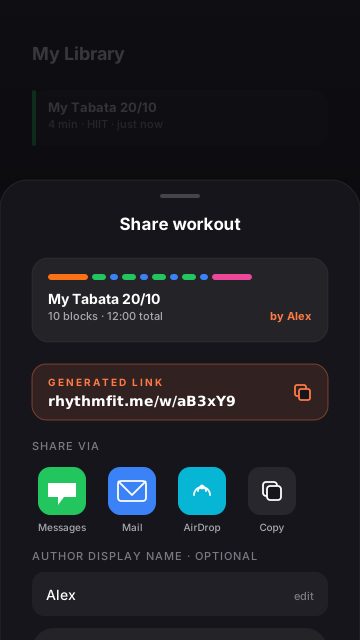
The action sheet shows up. Share workout creates the link. First-time users get a one-screen explainer about what's in the link.
Optionally attach an author name
A text field appears. Whatever you type becomes the visible byline on the share preview ("by Alex"). Leave blank for anonymous. The name is stored with the share — recipients see it; you can edit later from Settings → Sharing → My shared workouts.
Tap Generate link
A 6-character code is created on our server. You get the
rhythmfit.me/w/…URL ready to paste anywhere.Share via the iOS share sheet
Messages, email, Slack, AirDrop, copy to clipboard — all the usual destinations. The link unfurls to a rich preview on iMessage and Twitter.
Importing a share
Three ways recipients can open your link:
1. Direct tap (iOS, app installed)
Tapping the link in Messages, Mail, or anywhere else opens RhythmFit to the share preview. They see workout name, block list, total duration, BPM, and your author name. Tapping Add to My Library imports the workout into their My tab.
2. Web preview (iOS, app not installed)
The same link opens the SSR-rendered preview at rhythmfit.me/w/… with a "Get the app" CTA. Once they install and re-open the link, it deep-links into the app via Universal Links.
3. Paste from clipboard (fallback)
Some apps strip URLs from their previews. If the recipient has the URL in clipboard but the deep link won't fire, they can open RhythmFit and tap the small link button in the create row on the My tab (also available in Settings → Sharing → Paste Shared Link).
What's NOT in a share
Worth being explicit about, because share recipients sometimes expect more:
- No music. Your Apple Music selection doesn't travel. Recipients pick their own music in the imported workout.
- No your stats. Your session history, performance, and ratings stay with you.
- No videos. If the original workout has video reference links, the links travel (they're just URLs to YouTube etc.), but the videos themselves aren't hosted by us.
Managing your shared workouts
Settings → Sharing → My shared workouts
The list shows every workout you've ever published, with import counts.
Tap any entry to see options
- Copy link
- Edit author name
- Replace with current version of the workout
- Delete (link returns 404 immediately after server purge)
The first column shows the share's status
- Live — the link works.
- Pulled — you deleted it; the link is dead.
- Removed by moderation — see below.
Rate limits
The first share each day is instant. After ~10 in a 24-hour window, the share button surfaces "Daily share limit reached." This isn't configurable — it's a server-side defense against bulk creation / abuse. Wait until tomorrow (UTC) and you can share again.
Moderation
We profanity-filter workout names, labels, and reminders before the row is written. If your share contains flagged text you'll see "Content not allowed" and the link isn't created. Edit the text and try again.
After creation, anyone can Report a share from the preview sheet. Reports are reviewed within 72 hours; we may pull the share without notice if it breaks the shared content guidelines.