
title: Your first workout description: From install to the celebration screen — the path most people take on day one.
Your first workout
Two minutes. No account, no permissions to grant — RhythmFit is designed so a new user can finish a complete workout before deciding whether to sign in.
What happens on first launch
A short onboarding asks your goal
Three options: Improve performance, Learn movement, or Build a habit. The answer biases which built-in templates get recommended, but nothing locks you out — you can change your mind any time from Settings → Onboarding.
Health & Safety screen
A one-page medical disclaimer. Tap I understand to continue. The same content lives later under Settings → About → Health & Safety.
A recommended workout appears
Based on your goal answer. Common picks are a 6-minute Tabata, a 3-minute breathing primer, or a 10-minute mobility loop. You can also pick a different one from the Library.
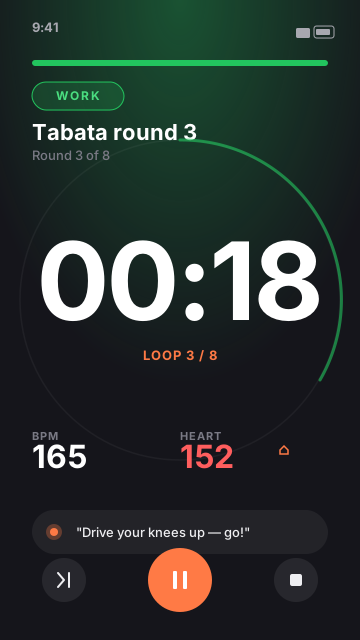
Tap Start and the Execute screen takes over
That's the big workout runner. A 3-second countdown plays before the first block. Phase name, time remaining, BPM, and the current color all update live.
Finish or skip — the celebration shows your stats
Time on each phase, total duration, average BPM, and an option to save the session. Skipping never hides the celebration — it just shows a partial summary.
Permissions you'll be asked for
RhythmFit asks for permissions only when a feature needs them — not all up-front. The five you might see:
- Notifications — only if you set a workout reminder. Skip = no reminders, app still works.
- Microphone + Speech Recognition — only if you dictate to the AI create chat. Skip = type instead; Siri voice control still works.
- HealthKit — only when you start a workout with Apple Watch features or want to write sessions to the Health app. Skip = the live heart-rate display stays empty and sessions aren't saved to Health.
- Apple Music — only when you tap the music icon and choose the Apple Music source.
- Camera + Photo Library — only when you import a workout from a photo or PDF.