
title: Importing from photo or PDF description: Snap a workout sheet or import a coaching PDF — AI extracts the blocks.
Importing from photo or PDF Pro
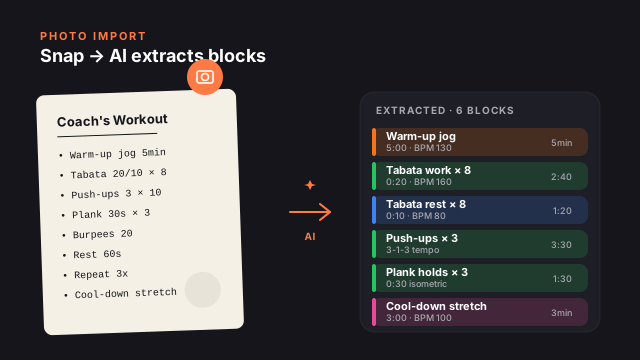
If you have a workout written down — a printed sheet from a coach, a PDF program, a magazine clipping, a whiteboard at the gym — you don't have to retype it. Image and PDF imports use the same AI pipeline as text generation, just with a different input.
This is Pro-only. Each import counts as one of your unlimited Pro AI generations.
What works well
The AI is good at:
- Structured tables (rows × sets × reps).
- Bullet lists of exercises with times or rep counts.
- Coaching PDFs from common platforms (TrainHeroic, Strong, etc.).
- Whiteboard photos with reasonable handwriting.
- Magazine spreads where the workout is laid out as a single column.
The AI struggles with:
- Multi-column dense layouts (it picks one column).
- Cursive or stylized handwriting (it tries; check the result).
- Workouts that depend on visual diagrams the text doesn't describe.
- Non-English content (it works, but cue quality drops).
Importing a photo
AI Create → 📷 attach
The camera/photo picker opens. Choose Take Photo for something in front of you, or Choose from Library for a saved image.
Optional — add a guiding prompt
You can leave it blank, but a one-line steer helps:
- "Extract this workout, intermediate level"
- "Convert this into intervals, BPM around 160"
- "Tempo strength — make every block 3-1-3 cadence"
If you skip the prompt the AI infers from the image alone.
Tap Send
Processing takes 8–20 seconds depending on image complexity. You see a typing indicator. The result is a workout preview.
Review and refine
Same conversational pattern as text generation. "Drop the second block", "Add a 5-min cool-down", "Cap total time at 25 minutes" all work.
Save to My Library
Once happy, tap Save to My Library. The image isn't kept — only the extracted workout structure.
Importing a PDF
Same flow, different attach button.
AI Create → + → Import PDF
The Files picker opens. Choose any PDF — coach handout, magazine clipping, downloaded program.
The AI scans up to the first 5 pages
Extracted text is also capped at about 4,000 characters, so larger PDFs are truncated. If your program is multi-day, send each day as a separate import.
The AI proposes a workout for ONE session
PDFs often contain multi-week programs. The AI picks the most self-contained workout (usually "Day 1" or the first session) and asks you to confirm. To get a different day: "Use Day 3 from the PDF instead."
Importing a text file
The same + button also accepts plain-text (.txt) files — useful for workouts exported from notes apps or shared as text. The flow is identical to PDF import, with the same limits: content is capped at about 4,000 characters, and each import counts as one generation.
Privacy
Imports go through the same path as text generation:
- What Claude sees: the image or PDF content, your guiding prompt, the conversation history.
- What it doesn't see: your name, location, HealthKit data, your other workouts, anything from another app.
- What we store: nothing. The image isn't retained server-side past the generation.
- Anthropic's training: prompt data is not used to train models per their commercial API policy.
See Permissions and privacy for the full data path.
Common refinement prompts
After an import, you'll usually want to adjust. The AI handles all of these conversationally:
- "Make every block 30 seconds shorter."
- "Replace the burpees with mountain climbers — I have a bad knee."
- "Add Learning Mode notes to the squat blocks."
- "Cap total time at 20 minutes — drop the lowest-priority block."
- "Convert this to tempo strength — 3-1-3 cadence on every work block."
- "Add a 5-minute breathing cool-down at the end."
Quota math
| Action | Cost | | ------------------------------------- | ---------------------- | | One photo import | 1 generation | | One PDF import | 1 generation | | One text file import | 1 generation | | Refining the result within the same conversation | Free (same generation) | | Starting a new conversation about the same import | 1 generation |
Free users don't have access to photo/PDF imports at all. The 📷 and + Import PDF options are hidden on the AI Create screen; the welcome trial unlocks them for 7 days.